The short version
- Your Google Business Profile does most of the work for local searches, so fill in every part of it.
- Ask every happy customer for a review, every time, and make it easy for them.
- Your website should match your profile and say clearly what you do and where.
- Your profile ranks mostly around your address. For towns further out, you need a page on your website for each one.
How Google picks who to show
When someone searches for something like "cleaner near me" or "garage in Bletchley", Google shows a map with a few businesses under it before any normal results. Most of the calls go to those few businesses.
Google says it decides who goes in that map on three things. Relevance is how well your business matches what was searched. Distance is how far you are from the person searching, or from the town they typed. Prominence is how well known and well thought of your business is, which includes your reviews and your website.
You can't move your business closer to everyone. Relevance and prominence are where you can make a difference, and most of the steps below come back to one of those two.
Set up your Google Business Profile properly
Your Google Business Profile is the listing that shows on the map, with your reviews, photos, opening hours and a call button. It's free, and it's usually the first thing a new customer sees. A lot of the profiles I look at have been claimed and then left half finished.
Pick the right main category
Your main category is the single biggest signal of what you do. Choose the one that matches the work you want most, like "House cleaning service" or "Car repair and maintenance service". Then add other categories for anything else you do.
Fill in your services and areas
Add each service you offer, with a short description in plain words. Add the towns and villages you cover as service areas. If customers come to you, make sure your address and opening hours are right.
Use your real business name
It's tempting to call yourself "Smith's Cleaning Aylesbury Cheap Deep Cleans". Google's rules say your name should be what's on your van and your invoices. Profiles with stuffed names get reported by competitors and suspended.
Link it to your website
Add your website address, and use the same business name, phone number and address on your website as on your profile. When the details match, Google can be more confident they're the same business.
Get reviews, and keep getting them
Reviews are the part of prominence you have the most control over. They also do the selling for you: when someone is choosing between three businesses on the map, the one with plenty of recent, good reviews usually gets the call. Google says high-quality, positive reviews can improve your visibility.
- Ask every time. Most happy customers will leave a review if you ask. Most won't think to if you don't.
- Make it one tap. Send them the direct review link from your profile, by text or WhatsApp, the same day the job is done.
- Put a QR code on your cards and flyers. It takes people straight to the review box.
- Reply to every review, good or bad. A calm, polite reply to a bad review often reassures people more than the five-star ones.
Never buy reviews, swap them with other businesses or only ask the customers you know are happy. Fake reviews are against Google's rules, and in the UK they've been illegal since April 2025.
A website that backs it up
Plenty of people tap through to your website before they call, and Google looks at it too. A good website for this job does a few simple things:
- says what you do and where in the first line people read
- has a page for each main service, using the words your customers use
- loads quickly and is easy to use on a phone
- has call, WhatsApp and quote buttons where people can find them
- shows your reviews and real photos of your work
- has a security certificate, so browsers don't warn visitors it's "Not secure"
If you're choosing someone to build it, my guide on how to choose a web designer has the questions to ask first.
Pages for the towns you cover
This is the part most businesses miss. Your Google profile ranks mostly around your own address. Adding a town as a service area doesn't mean you'll show up there. If you're based in Aylesbury and want work in Tring or Thame, your profile alone probably won't get you onto those maps.
Your website can help close the gap. A page for each town you want more work in, saying what you do there, which areas you cover and showing jobs you've done nearby, gives Google a reason to show you to people searching in that town.
Each page needs to be useful in its own right. Twenty copies of the same page with the town name swapped won't help, and can make your whole site look thin to Google.
Real photos
Google says businesses with photos on their profile get more requests for directions and more clicks through to their website than those without. People want to see who's turning up and what the work looks like.
Add photos of you, your team, your van and your finished jobs, and keep adding them. Phone photos are fine if they're bright and in focus. Stock photos are easy to spot and do the opposite of what you want.
Keeping it active
A profile that was set up two years ago and never touched again slowly falls behind ones that are looked after. Once a month is enough for most businesses:
- add a few photos from recent jobs
- reply to any new reviews
- check your hours, especially around bank holidays and Christmas
- answer any questions people have left on your profile
- check your messages, if you've switched them on, because slow replies lose jobs
What this looked like for Beth
Beth runs Our Cleaning Company in Aylesbury. When we started, her Google profile had been claimed but was only half finished, and her website needed rebuilding.
I set her profile up for Aylesbury and the towns around it, filled in her services and matched everything to her new website. I gave her a review request message and a QR code. She texted the message to her clients and got 21 Google reviews in two weeks.
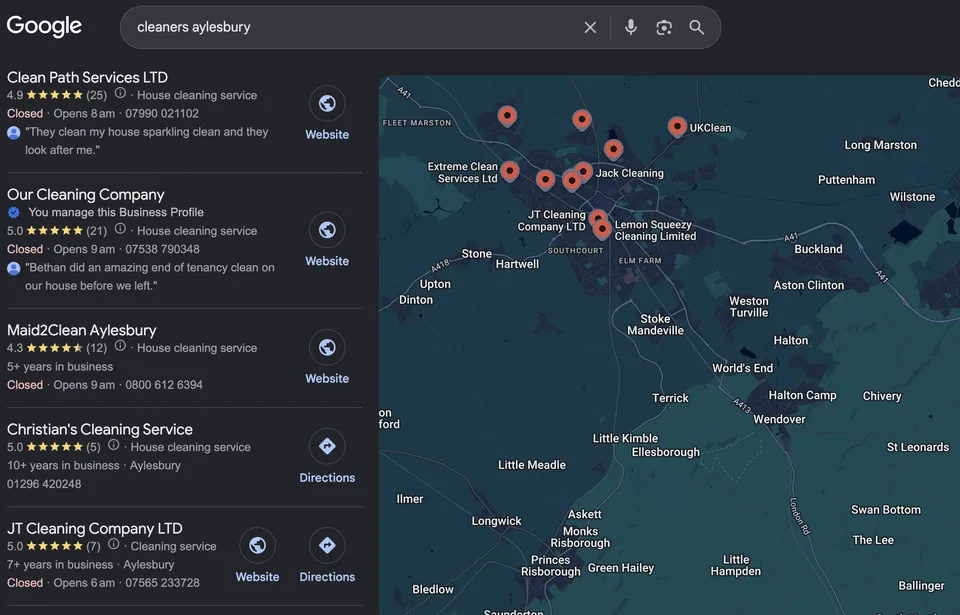
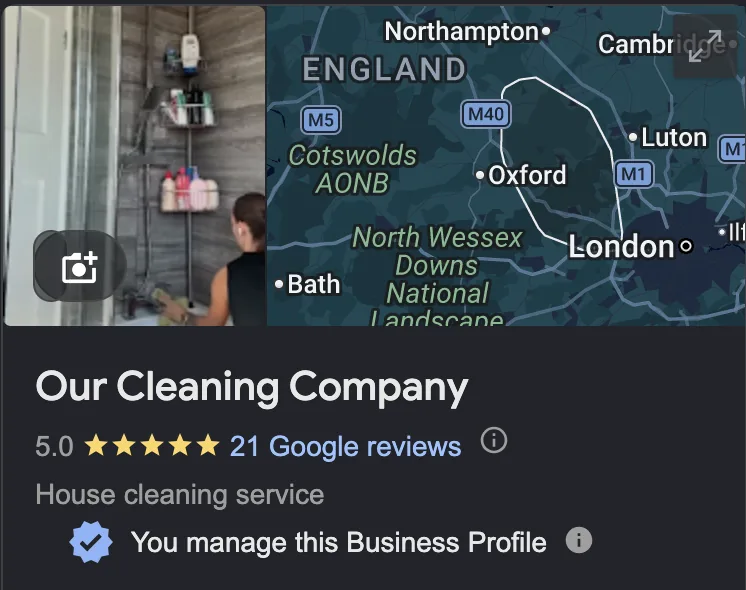
Her profile now ranks well when people in Aylesbury search for cleaners. In her words, enquiries went "through the roof", and she's since taken on extra staff to keep up. Read Beth's story.
None of it was complicated. Her profile was complete, her website matched it and she asked her customers for reviews. Most local businesses I look at are missing at least one of those.
Things to avoid
- Using a virtual office or a friend's address to look closer to a town. Google's rules don't allow it, and profiles get suspended for it.
- Having two profiles for the same business. Merge or remove the extra one.
- Paying anyone who guarantees you the top of the map. Nobody controls Google's results.
- Buying reviews, or offering discounts in exchange for five stars.
- Handing over your profile. It should stay in your own Google account, with anyone helping you added as a manager.
A checklist you can work through in an hour
- Profile claimed, verified and in my own Google account
- Main category matches the work I want most
- Services and service areas filled in
- Real business name, with no extra keywords
- Phone, address and website match my website
- Direct review link saved on my phone
- Review QR code on my cards or flyers
- Replied to every review
- At least ten real photos uploaded
- Website says what I do and where, and works well on a phone
- A page on my website for each town I want more work in
- A monthly reminder to add photos and check my profile
Want to know why someone else is above you on the map? Send me your business name and I'll check your profile and website for free.
Get my free check